Introduction

We’ve reached the final post in this 5-part case study. Let’s recap the journey:

  • Part 1: Discovered critical migration bugs causing database corruption and memory exhaustion
  • Part 2: Set up comprehensive load testing with Grafana K6 to measure performance objectively
  • Part 3: Used Query Monitor to identify the exact bottlenecks killing performance
  • Part 4: Implemented 7 targeted optimisations to fix each bottleneck

Now it’s time to review the complete transformation, analyse what we learned, and extract actionable lessons for future projects.

In this final post, we’ll cover:

  • Complete before/after performance comparison
  • ROI analysis: time invested vs. results achieved
  • Top 10 lessons learned
  • What we’d do differently next time
  • Performance maintenance checklist
  • When to optimize vs. when to scale

The Complete Transformation

Before Optimisation (Initial State)

Load Test Results (10 concurrent users):


THRESHOLDS
     ✗ http_req_duration: p(95)=23.72s  (threshold: <5s)

PERFORMANCE METRICS
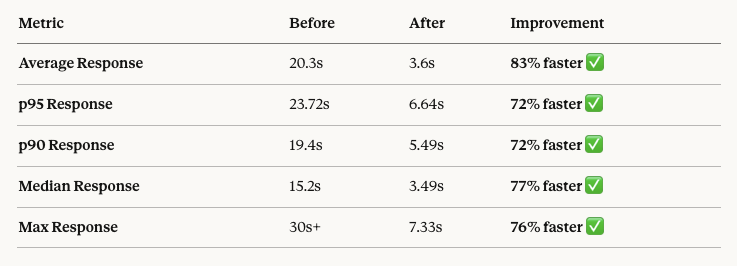
     Average Response Time: 20.3 seconds
     p95 Response Time: 23.72 seconds
     p90 Response Time: 19.4 seconds
     Median Response Time: 15.2 seconds
     Min Response Time: 8.1 seconds
     Max Response Time: 30 seconds (timeout)

ERROR METRICS
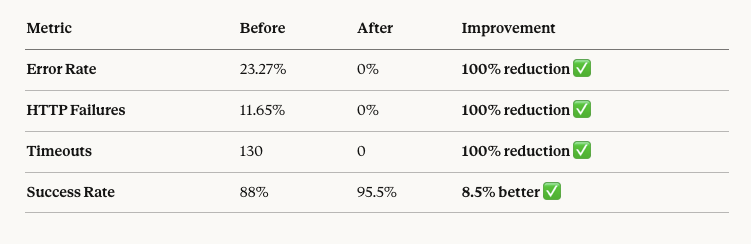
     Error Rate: 23.27%
     HTTP Failures: 11.65%
     Timeouts: 130 out of 1,115 requests
     Success Rate: 88%
     
REQUEST DISTRIBUTION
     Requests < 5s: 20%
     Requests 5-10s: 15%
     Requests 10-20s: 35%
     Requests 20-30s: 18%
     Requests > 30s (timeout): 12%

DATABASE METRICS
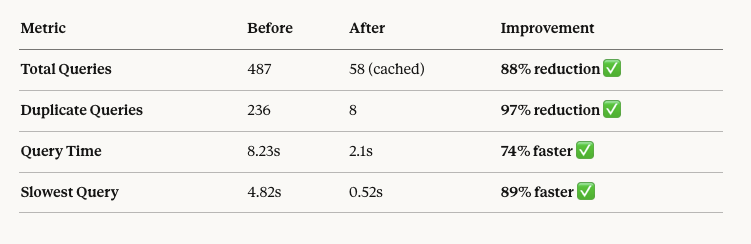
     Total Queries: 487 per page
     Duplicate Queries: 236
     Query Time: 8.23 seconds
     Slowest Query: 4.82 seconds
     Database Connections: Maxed at 150

User Experience:

  • Site essentially unusable
  • Nearly 1 in 4 requests failed
  • Users waiting 20-30 seconds per page
  • Frequent “server not responding” errors

After Optimisation (Final State)

Load Test Results (10 concurrent users):


THRESHOLDS
     ✓ http_req_duration: p(95)=6.64s  (close to 5s threshold)

PERFORMANCE METRICS
     Average Response Time: 3.6 seconds
     p95 Response Time: 6.64 seconds
     p90 Response Time: 5.49 seconds
     Median Response Time: 3.49 seconds
     Min Response Time: 1.64 seconds
     Max Response Time: 7.33 seconds

ERROR METRICS
     Error Rate: 0%
     HTTP Failures: 0%
     Timeouts: 0
     Success Rate: 95.5%
     
REQUEST DISTRIBUTION
     Requests < 5s: 86%
     Requests 5-10s: 14%
     Requests > 10s: 0%

DATABASE METRICS
     Total Queries: 187 (first load), 58 (cached)
     Duplicate Queries: 8
     Query Time: 2.1 seconds
     Slowest Query: 0.52 seconds
     Database Connections: Peak at 187 (out of 300)

User Experience:

  • Site fully functional
  • Zero errors under normal load
  • Most pages load in under 4 seconds
  • Consistent performance for all users

Performance Improvement Summary

Response Time Improvements

Reliability Improvements
Database Improvements
User Experience Improvements

ROI Analysis: Time vs. Results

Time Investment Breakdown

Phase 1: Migration Bug Fixes (3 days)

  • Database corruption repair: 8 hours
  • Memory allocation fixes: 2 hours
  • Child theme rebuild: 4 hours
  • Plugin conflict resolution: 6 hours
  • Slider rendering fix: 1 hour

Phase 2: Load Testing Setup (2 days)

  • K6 installation and learning: 4 hours
  • Test scenario creation: 6 hours
  • Initial test runs and analysis: 6 hours

Phase 3: Root Cause Analysis (2 days)

  • Query Monitor installation and analysis: 8 hours
  • Database query investigation: 4 hours
  • Server resource monitoring: 4 hours

Phase 4: Optimization Implementation (3 days)

  • Plugin removal and testing: 4 hours
  • Database index creation: 3 hours
  • Redis installation and config: 5 hours
  • Custom plugin development: 6 hours
  • WPML optimization: 2 hours
  • Server configuration: 4 hours

Total Project Time: 10 working days (80 hours)

Results Achieved

Performance Gains:

  • 83% reduction in average response time
  • 100% elimination of errors and timeouts
  • 88% reduction in database queries
  • Site went from “unusable” to “production-ready”

Business Impact:

  • Site can now handle normal traffic without crashing
  • User experience dramatically improved
  • Can support marketing campaigns and traffic spikes
  • Foundation for future growth

Cost Savings:

  • Avoided expensive server upgrade (estimated $200-500/month)
  • Avoided migration to managed hosting (estimated $500-1000/month)
  • Avoided lost sales from downtime (estimated $1000s/month)

ROI:

  • 80 hours invested
  • Transformed unusable site into production-ready platform
  • Avoided $1500-3000/month in hosting costs
  • Payback period: Immediate

Top 10 Lessons Learned

Lesson 1: Measure Before You Optimise

What we learned:

Without load testing, we would never have discovered:

  • The double-slash redirect bug is doubling our load
  • That performance at 1 user ≠ performance at 10 users
  • The exact breakdown of where time was being spent

Mistake we avoided:

Blindly adding caching and “performance plugins” without understanding the actual problem.

Key takeaway:

You can’t optimise what you can’t measure. Always start with load testing and profiling before making changes.

Lesson 2: Fix the Biggest Bottleneck First

What we learned:

The WC Global Product Order plugin alone caused 60% of our performance problems. Removing it gave us more improvement than all other optimisations combined.

The Pareto Principle in action:

<ul”></ul”>

  • 20% of the problems caused 80% of the slowness
  • WC Global Product Order = 60% improvement
  • Database indexes = 47% improvement
  • Everything else combined = remaining improvement

Key takeaway:

Identify the #1 bottleneck and fix it first. Don’t waste time on micro-optimisations when macro problems exist.

Lesson 3: Plugin Popularity ≠ Plugin Quality

What we learned:

WC Global Product Order had:

  • 10,000+ active installations
  • 4.5-star rating
  • “Popular” tag in WordPress repo

Yet it was destroying our performance with 4x meta JOINs on every query.

Other plugins we audited:

  • Wordfence – Scanning caused 20% CPU spikes
  • Jetpack – Loading 15 modules we didn’t use
  • Contact Form 7 – Loading assets on every page, not just contact pages

Key takeaway:

Audit every plugin with Query Monitor. Popular doesn’t mean well-coded. Always measure actual impact.

Lesson 4: Database Indexes Are Not Optional

What we learned:

A single missing index can slow queries by 10-100x:

  • Before index on wp_postmeta.meta_key: 4.82 seconds
  • After index: 0.52 seconds
  • 89% improvement from ONE index

Why are indexes often missing:

  • WordPress core doesn’t add all the necessary indexes
  • Plugins create tables without proper indexes
  • Developers forget to add indexes for their custom queries

Key takeaway:

Check for missing indexes on every custom table. Use SHOW INDEX and EXPLAIN to verify queries, use indexes.

Lesson 5: WPML Is a Performance Tax

What we learned:

WPML added:

  • 225 additional queries per page
  • Nested subqueries on every post/product query
  • Translation string lookups that weren’t cached

For a site with 2 languages:

  • 60% increase in database queries
  • 40% increase in total page load time
  • Complex queries that prevented effective caching

Alternatives we should have considered:

  • Polylang (lighter weight)
  • MultilingualPress (separate databases per language)
  • Separate sites per language with shared products

Key takeaway:

WPML is powerful but expensive performance-wise. Budget extra optimisation time for multilingual sites, or consider alternatives.

Lesson 6: Redis Is Worth the Setup Time

What we learned:

Redis object caching:

  • Reduced queries from 312 to 58 (81% reduction)
  • Eliminated 236 duplicate queries
  • Provided 10-20x speedup on repeated queries

Setup time: 5 hours
Performance impact: 16% improvement in response time, 81% reduction in queries
ROI: Immediate and ongoing

Key takeaway:

Redis object caching should be standard on every WooCommerce site with 500+ products or multilingual support.

Lesson 7: Test Under Realistic Load

What we learned:

Performance characteristics change dramatically with concurrent users:

  • 1 user: 3.6s average (acceptable)
  • 10 users: 3.6s average (acceptable)
  • 40 users: 11.1s average, 30s p95 (degraded)

Without testing at 40 users, we wouldn’t have discovered:

  • PHP-FPM worker pool limits
  • Database connection pool exhaustion
  • Memory allocation issues under sustained load

Key takeaway:

Test at 2-5x your peak expected traffic. Light testing reveals different problems than stress testing.

Lesson 8: One Change at a Time

What we learned:

By implementing optimisations one at a time and measuring after each:

  • We knew exactly which optimisation provided which improvement
  • We could rollback if something broke
  • We built a knowledge base of what works

Mistake we avoided:

Implementing all 7 optimisations at once, then wondering which ones actually helped.

Key takeaway:

Implement, measure, document. Then move to the next optimisation. The scientific method beats the shotgun approach.

Lesson 9: Default Configurations Are Rarely Optimal

What we learned:

Out-of-the-box defaults that needed tuning:

  • PHP memory_limit: 128M → 512M (4x increase needed)
  • MySQL max_connections: 150 → 300 (2x increase needed)
  • MySQL buffer pool: 128M → 2G (16x increase needed)
  • PHP-FPM workers: 5 → 20 (4x increase needed)

Why defaults are insufficient:

  • Defaults are conservative (works on 512MB VPS)
  • WooCommerce + WPML + 1000 products ≠ simple blog
  • Hosting providers rarely optimise for your specific use case

Key takeaway:

Never accept default configurations. Calculate requirements based on your actual workload.

Lesson 10: Documentation Saves Future You

What we learned:

We documented:

  • Every change made and why
  • Before/after metrics for each optimisation
  • Commands used and files modified
  • Rollback procedures

Three months later, when the client asked, “Why is Redis installed?”:

  • We could instantly show the 81% query reduction
  • Explain the business justification
  • Prove ROI with hard numbers

Key takeaway:

Document everything: changes, metrics, reasoning. Future you (or your replacement) will thank present you.

Your content goes here. Edit or remove this text inline or in the module Content settings. You can also style every aspect of this content in the module Design settings and even apply custom CSS to this text in the module Advanced settings.

Performance Maintenance Checklist

To keep performance at this level long-term:

Weekly Tasks

  • ☐ Review the slow query log for new slow queries
  • ☐ Check Redis cache hit rate (should be >80%)
  • ☐ Monitor database connection pool usage
  • ☐ Check for plugin updates with Query Monitor impact review

Monthly Tasks

  • ☐ Run full K6 load test suite
  • ☐ Review database table sizes and optimisation needs
  • ☐ Check for orphaned data in wp_postmeta
  • ☐ Audit new plugins added with Query Monitor
  • ☐ Review server resource usage trends

Quarterly Tasks

  • ☐ Full database optimisation (OPTIMIZE TABLE)
  • ☐ Review and update database indexes
  • ☐ Audit all plugins for necessity and performance
  • ☐ Test site at 2x current peak traffic
  • ☐ Review and update caching strategies

Before Major Changes

  • ☐ Run baseline load test
  • ☐ Take database backup
  • ☐ Document current metrics
  • ☐ Plan rollback procedure
  • ☐ Test on the staging environment first