5-Part Case Study Series — Complete
Five parts. Ten working days. One WooCommerce site taken from essentially unusable to production-ready. Here’s the complete before/after, the ROI breakdown, and the 10 lessons that apply to every performance project we’ll do from here.
83%
Faster response
0%
Error rate
88%
Fewer DB queries
10 days
Total project time
Complete before vs. after
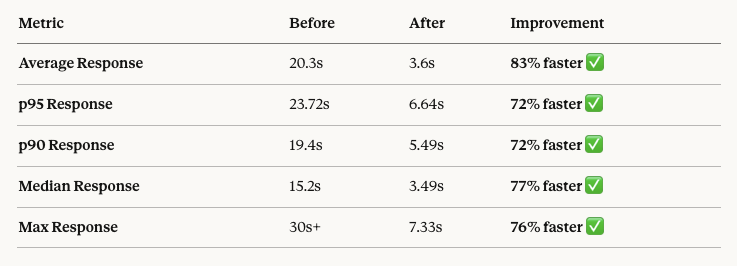
BeforeAvg response: 20.3s
p95 response: 23.72s
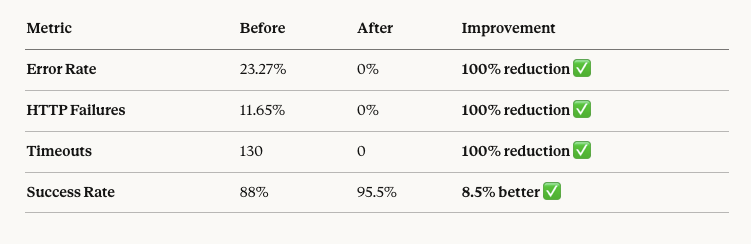
Error rate: 23.27%
Timeouts: 130 of 1,115 requests
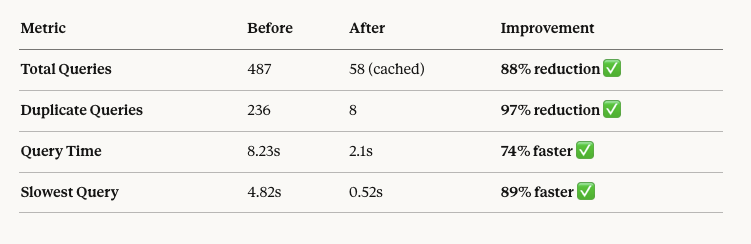
DB queries/page: 487
Duplicate queries: 236
Slowest query: 4.82s
Requests under 5s: 20%
After all 7 fixesAvg response: 3.6s
p95 response: 6.64s
Error rate: 0%
Timeouts: 0
DB queries/page: 58 (cached)
Duplicate queries: 8
Slowest query: 0.52s
Requests under 5s: 86%

ROI: time invested vs. results
80 hours over 10 working days:
Phase 1 — Bug fixes (3 days)
DB corruption, memory limits, child theme, plugin conflicts, slider.
Phase 2 — Load testing (2 days)
K6 setup, test scenarios, initial runs and analysis.
Phase 3 — Root cause (2 days)
Query Monitor analysis, DB investigation, server monitoring.
Phase 4 — Optimisation (3 days)
Plugin removal, indexes, Redis, WPML config, server tuning.
Cost avoided by fixing instead of upgrading:
Server upgrade: ~$200–500/month saved | Managed hosting migration: ~$500–1,000/month saved | Lost sales from downtime: estimated $1,000s/month. Payback period: immediate.
10 lessons that apply to every WooCommerce project
1Measure before you optimiseWithout load testing you’ll never know that 1 user performance means nothing. Always start with K6 or equivalent before touching anything.
2Fix the biggest bottleneck firstOne plugin caused 60% of the problem. The Pareto principle is real — find the one thing causing 80% of the pain and fix that first.
3Plugin popularity ≠ plugin qualityThe worst offender had 10,000+ installs and 4.5 stars. Audit every plugin with Query Monitor. Measure actual impact, not reputation.
4Database indexes are non-negotiableOne missing index caused a 10x slowdown. WordPress doesn’t add all necessary indexes by default — especially for WooCommerce + WPML stacks.
5WPML is a performance taxAdding 225 queries per page is the cost of multilingual support. Budget extra optimisation time for any site using WPML, or evaluate Polylang as a lighter alternative.
6Redis is worth the setup time5 hours of setup eliminated 236 duplicate queries and delivered an 81% reduction in database calls. Should be standard on every WooCommerce site.
7Fix bugs before optimisingApplying caching to a broken site just hides the problems. Phase 1 emergency fixes were a prerequisite for everything else — you cannot optimise a broken foundation.
8One change at a timeIf you stack multiple changes, you won’t know which one worked — or which one broke something. Discipline here pays dividends when things go wrong.
9Migration is never just “move files”MariaDB version mismatches, PHP config differences, and default settings cause cascading issues that only appear under load. Every migration needs a full post-migration load test.
10Optimise before you scaleThe instinct was to upgrade the server. The right move was to fix inefficient code. Scaling a broken system just costs more money for the same bad experience.
Series complete
Read the full case study from the beginning
Start with Part 1 to see the full journey from a broken post-migration site to a production-ready WooCommerce store.
Start from Part 1 →
Your site could be next
Is your WooCommerce site slow, crashing, or unreliable?
We apply this exact methodology — measure, identify, fix in order of impact — to bring your site back to performance.
Get a Free Performance Audit